Solution What is wrong with heexternal://

The thread has a solution

oldteacher

Active member
For life of me cannot figure out why this is not working:

Code:
<a class="d-block" href="heexternal://https://411center.com/r/exeoutput-magicai">
                            <img
                                src="exeoutput-qiksoft.webp"
                                alt="ExeOutput for Magic AI"
                                class="d-block w-100 img-fluid"
                                style="height: auto; object-fit: contain;"
                            >
                        </a>

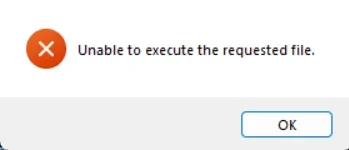
I get:

1775332846811.webp

This makes no sense to me.
 
The syntax heexternal:// followed by a full URL should work correctly for opening external links in the user's default browser.

Your code looks correct in principle:

Code:
<a href="heexternal://https://411center.com/r/exeoutput-magicai">...</a>

A few things to check:

1. Test with a simple text link first to rule out any issue with the image wrapper:
Code:
<a href="heexternal://https://411center.com/r/exeoutput-magicai">Click here</a>

2. Check your Security settings in ExeOutput: make sure external URL navigation is not blocked. Go to Application Settings > Security and verify that external links are allowed.

3. Try without the nested HTML: your <a> tag contains a <img> with multiple classes and inline styles. Try simplifying the link first to isolate the issue.

4. Which ExeOutput version are you using? And which CEF/rendering engine version is selected in your project?

Could you also describe or share the exact error message you see when clicking the link? The screenshot in your first post does not seem to have loaded properly.
 
1. Test with a simple text link first to rule out any issue with the image wrapper:

(A) Doesn't work, plain links do not work either.


2. Check your Security settings in ExeOutput: make sure external URL navigation is not blocked. Go to Application Settings > Security and verify that external links are allowed.

(A) I see no such setting, there is no "Security" under Application Settings. There is no such setting under Security either.

3. Try without the nested HTML: your &lt;a&gt; tag contains a &lt;img&gt; with multiple classes and inline styles. Try simplifying the link first to isolate the issue.

(A) Plain links return the same

4. Which ExeOutput version are you using? And which CEF/rendering engine version is selected in your project?

(A) 2025.0, CEF V139.0.38

I just tried WebView 2 and all links (including one with image) work just fine. This is a CEF issue.
 
Last edited:
Another worthy note: The older CEF version for Win 7 works, the links open in default browser.

Be more than happy to tray any fix you may have for newer version.
 
Will this be dealt with and updated anytime in the very near future? Like to use ExeOutput for my project but cannot in current state.
 
Could you please try:
https://download.exeoutput.com/tmp/EXORun1D.7z

Once downloaded, follow these steps:

1) Extract the EXORun.dat file from the archive.
2) Move it into the CEFRuntime subfolder inside your ExeOutput for PHP installation directory, replacing the existing file.
3) Restart ExeOutput for PHP and rebuild your project.

Please let us know if this works for you.
 
Back
Top