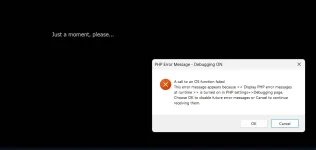
Solution Call to OS Function Failed

The thread has a solution
A few questions to help narrow this down:

- Does this error happen every time you run the EXE, or is it random/intermittent?
- Have you tried restarting your PC and running the EXE again?
- Do you have any antivirus software that might be interfering (Windows Defender, or a third-party one)?
- Was this EXE built with ExeOutput for PHP 2025.2 (the latest version)?

This will help us investigate the root cause.
 
- Does this error happen every time you run the EXE, or is it random/intermittent? It is intermittent and random.
- Have you tried restarting your PC and running the EXE again? Restarting has no effect, have tried this a couple of times.
- Do you have any antivirus software that might be interfering (Windows Defender, or a third-party one)? Only run Microsoft Defender built-in and no alerts. HJave double checked this.
- Was this EXE built with ExeOutput for PHP 2025.2 (the latest version)? Built with the latest version that I just installed.
 
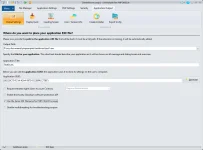
Did disabling that option fix the issue? Please let us know if the error still occurs after unchecking it and rebuilding your EXE.
 
Did disabling that option fix the issue? Please let us know if the error still occurs after unchecking it and rebuilding your EXE.

Sorry for delay. I have tested the exe quite a few times and have not had the error again.

Very strange to me, I have never checked that before and have no clue how it got checked, guess I fat fingered it :)

What is the real purpose of that setting and when is a good time to ever use it?
 
Last edited:
Glad to hear the issue is resolved!

That setting is related to how secondary processes are named. It is mainly intended for companies with strict security rules regarding allowed processes.

Since everything works correctly without it, we recommend keeping it disabled for your project.
 
Just another note for the team: I compiled a project in latest CEF then wanted to see same project in WebView2, so switched. Little later while software running got the call to os error.
 
Good to hear that close-and-reopen brings it back. The behaviour you describe (random "Call to OS Function Failed" that disappears on restart of the EXE, with the secondary-process-naming option correctly disabled this time) is consistent with a transient resource conflict rather than a permanent misconfiguration: a child process (CEF helper, PHP CGI, WebView2 broker) inherits a handle / port / shared-memory section that a previous instance did not release cleanly, and a fresh launch reclaims it without issue.

You do not need to do anything urgent on this. If it starts happening more often or you want to diagnose it the next time it triggers, here are the data points that would let us pin it down:

  • Open Windows Event Viewer → Windows Logs → Application right after the error appears, and copy the most recent error entry whose source matches your EXE name or CEF / EdgeWebView. The text there is much more specific than the dialog and usually names the failing API call. Note whether the error coincides with switching renderer engines (you mentioned CEF → WebView2), with a Windows update applied that day, with another Chromium-based app being launched/closed at the same time, or with sleep/hibernate transitions. These are the four classic correlations for transient handle-state issues.
  • If you can reliably reproduce it by switching engines mid-run, that itself is reproducible enough for us to investigate, send a short repro recipe and we will reproduce on our side.
For day-to-day work the close-and-reopen workaround is acceptable, but if it ever escalates to the point where the EXE will not relaunch at all without a Windows reboot, that would be the moment to dig deeper. Until then, we will keep this thread bookmarked in case the pattern surfaces in another report.
 
Last edited:
Back
Top