

XLS Padlock 2026 is now available
We have released XLS Padlock 2026, the new major version of our Excel workbook protection software.
This release modernizes the core of the product and puts you back in control of what new AI features can do with a protected workbook. Three long-standing third-party components have been replaced with in-house engines, and the encryption used for save files and online activation has been reworked.
For members who are not yet familiar with the product:
 To upgrade, or to try it for the first time, download the latest version here:
Download XLS Padlock 2026
As always, we welcome your feedback. Let us know how the new version works for you.
We have released XLS Padlock 2026, the new major version of our Excel workbook protection software.
This release modernizes the core of the product and puts you back in control of what new AI features can do with a protected workbook. Three long-standing third-party components have been replaced with in-house engines, and the encryption used for save files and online activation has been reworked.
Key Highlights of Version 2026
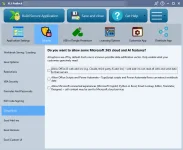
- Cloud and AI control: Protected workbooks now block Microsoft 365 cloud and AI surfaces by default, including Office JS web add-ins such as Claude for Excel, Office Scripts and Power Automate, and connected experiences like Copilot, Python in Excel, Smart Lookup, and Translator. A new Cloud and AI page lets you re-enable only what your customers actually need.
- New multilingual engine: XLS Padlock now uses the GNU gettext format (.po and .mo) for its 10 supported languages, and you can ship a single .po file to translate a protected application into any language. The documentation and PDF guide are now available in seven languages.
- New in-house VBA engine: A new engine produces universal bytecode that runs unchanged in 32-bit and 64-bit protected workbooks from a single compilation, with faster startup and a smaller runtime.
- Stronger encryption: XLSC and XLSCE save files now use AES-256-CTR encryption with HKDF-SHA256 key derivation and HMAC-SHA256 authentication. Files written by older versions still open without any change.
- Safer online activation: Your protected application can verify the activation server response with an Ed25519 signature before trusting it. This option requires the 2026 activation kit.
- Hardened startup: The application loader is protected against tampering, DLL search-order hijacking, and link redirection, and it enables Control Flow Guard and CET shadow stack on release builds.
- Fully branded launch: A new option runs your application entirely from your own VBA UserForms, with the Excel window and its taskbar icon never appearing.
For members who are not yet familiar with the product:
XLS Padlock turns a Microsoft Excel workbook into a standalone Windows application (an EXE file). Your formulas and VBA code stay hidden and cannot be copied, and you get built-in licensing, activation, and trial management, so you can distribute or sell your spreadsheet solutions while keeping control over your work.
To upgrade, or to try it for the first time, download the latest version here:Download XLS Padlock 2026
As always, we welcome your feedback. Let us know how the new version works for you.