
You are using an out of date browser. It may not display this or other websites correctly.
You should upgrade or use an alternative browser.
You should upgrade or use an alternative browser.
Code signing error
- Thread starter aa21
- Start date

A fix is available, please contact us by email.
I’m getting the same problem.
I get a success and then an immediate failure:
[5/22/2022 10:36:55 PM] GSignCode 2.1 – simple code signing utility
[5/22/2022 10:36:55 PM] Copyright G.D.G. Software 2011-2016. All rights reserved.
[5/22/2022 10:36:55 PM]
[5/22/2022 10:36:55 PM] Certificate Subject Name: CN=ManagementInfoConsultantsCertificate
[5/22/2022 10:36:55 PM] Issuer: CN=ManagementInfoConsultantsCertificate
[5/22/2022 10:36:55 PM] Serial Number: 6AF708BDEC913EA6473B0669FA85620E
[5/22/2022 10:36:55 PM]
[5/22/2022 10:36:55 PM] Signing F:\VBA Projects\Checkin_1.2\XLSPadlock_2022_0522_Test\MIC_1.26.exe
[5/22/2022 10:36:55 PM]
[5/22/2022 10:36:55 PM] File successfully signed.
[5/22/2022 10:36:57 PM] GSignCode 2.1 – simple code signing utility
[5/22/2022 10:36:57 PM] Copyright G.D.G. Software 2011-2016. All rights reserved.
[5/22/2022 10:36:57 PM]
[5/22/2022 10:36:57 PM] Certificate Subject Name: CN=ManagementInfoConsultantsCertificate
[5/22/2022 10:36:57 PM] Issuer: CN=ManagementInfoConsultantsCertificate
[5/22/2022 10:36:57 PM] Serial Number: 6AF708BDEC913EA6473B0669FA85620E
[5/22/2022 10:36:57 PM]
[5/22/2022 10:36:57 PM] Signing F:\VBA Projects\Checkin_1.2\XLSPadlock_2022_0522_Test\MIC_1.26.exe
[5/22/2022 10:37:00 PM] SIGNING ERROR:
[5/22/2022 10:37:00 PM] Signing Error - Code 0x80070020
[5/22/2022 10:37:00 PM] ERROR Application was not signed, an error occurred.
I get a success and then an immediate failure:
[5/22/2022 10:36:55 PM] GSignCode 2.1 – simple code signing utility
[5/22/2022 10:36:55 PM] Copyright G.D.G. Software 2011-2016. All rights reserved.
[5/22/2022 10:36:55 PM]
[5/22/2022 10:36:55 PM] Certificate Subject Name: CN=ManagementInfoConsultantsCertificate
[5/22/2022 10:36:55 PM] Issuer: CN=ManagementInfoConsultantsCertificate
[5/22/2022 10:36:55 PM] Serial Number: 6AF708BDEC913EA6473B0669FA85620E
[5/22/2022 10:36:55 PM]
[5/22/2022 10:36:55 PM] Signing F:\VBA Projects\Checkin_1.2\XLSPadlock_2022_0522_Test\MIC_1.26.exe
[5/22/2022 10:36:55 PM]
[5/22/2022 10:36:55 PM] File successfully signed.
[5/22/2022 10:36:57 PM] GSignCode 2.1 – simple code signing utility
[5/22/2022 10:36:57 PM] Copyright G.D.G. Software 2011-2016. All rights reserved.
[5/22/2022 10:36:57 PM]
[5/22/2022 10:36:57 PM] Certificate Subject Name: CN=ManagementInfoConsultantsCertificate
[5/22/2022 10:36:57 PM] Issuer: CN=ManagementInfoConsultantsCertificate
[5/22/2022 10:36:57 PM] Serial Number: 6AF708BDEC913EA6473B0669FA85620E
[5/22/2022 10:36:57 PM]
[5/22/2022 10:36:57 PM] Signing F:\VBA Projects\Checkin_1.2\XLSPadlock_2022_0522_Test\MIC_1.26.exe
[5/22/2022 10:37:00 PM] SIGNING ERROR:
[5/22/2022 10:37:00 PM] Signing Error - Code 0x80070020
[5/22/2022 10:37:00 PM] ERROR Application was not signed, an error occurred.
Last edited:
Answered to your PM.
I have the same issue.
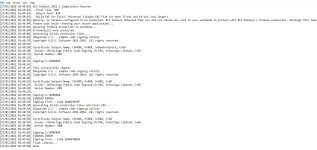
[28/6/2022 11:24:42 am] XLS Padlock 2021.1 Compilation Started
[28/6/2022 11:24:42 am] - Excel File: C:\Users\Andy\Desktop\xxxxxxxxxxxxxxxxxxxxxxxxxxxx
[28/6/2022 11:24:42 am] - Output Path: C:\Users\Andy\Desktop\xxxxxxxxxxxxxxxxxxxxxxxxxxxxxxxxx
[28/6/2022 11:24:42 am] - Build EXE for Excel: Universal (single EXE file for both 32-bit and 64-bit, but larger)
[28/6/2022 11:24:42 am] Warning: no formula configured to be protected. XLS Padlock detected that you did not choose any cell in your workbook to protect with XLS Padlock’s formula protection. Although this feature is not mandatory, we strongly recommend you to use XLS Padlock’s formula protection to secure some of your workbook’s cells, especially important formulas
[28/6/2022 11:24:42 am] Please wait while creating your secure application…
[28/6/2022 11:24:42 am] Applying formula protection to workbook…
[28/6/2022 11:24:42 am] 0 formula(s) were protected
[28/6/2022 11:24:42 am] Generating 64-bit protection files…
[28/6/2022 11:24:45 am] Generating 32-bit protection files and final EXE…
[28/6/2022 11:24:47 am] Final cleanup…
[28/6/2022 11:24:47 am] Done
[28/6/2022 11:25:32 am] GSignCode 2.1 – simple code signing utility
[28/6/2022 11:25:32 am] Copyright G.D.G. Software 2011-2016. All rights reserved.
[28/6/2022 11:25:32 am]
[28/6/2022 11:25:32 am] Certificate Subject Name: xxxxxxxxxxxxxxxxxxxxxxxxxxxxxxxxxxxxxxxxxxxx
[28/6/2022 11:25:32 am] Issuer: CN=Sectigo Public Code Signing CA R36, O=Sectigo Limited, C=GB
[28/6/2022 11:25:32 am] Serial Number: xxxxxxxxxxxxxxxxxxxxxxxxxxxxx
[28/6/2022 11:25:32 am]
[28/6/2022 11:25:32 am] Signing C:\Users\Andy\Desktop\xxxxxxxxxxxxxxxxxxxxxxxxxxxxxxxxxxxxxxxxxxxx
[28/6/2022 11:25:32 am]
[28/6/2022 11:25:32 am] File successfully signed.
[28/6/2022 11:25:34 am] GSignCode 2.1 – simple code signing utility
[28/6/2022 11:25:34 am] Copyright G.D.G. Software 2011-2016. All rights reserved.
[28/6/2022 11:25:34 am]
[28/6/2022 11:25:34 am] Certificate Subject Name: xxxxxxxxxxxxxxxxxxxxxxxxxxxxxxxxxxxxxxxxxxxxxxxxx
[28/6/2022 11:25:34 am] Issuer: CN=Sectigo Public Code Signing CA R36, O=Sectigo Limited, C=GB
[28/6/2022 11:25:34 am] Serial Number: xxxxxxxxxxxxxxxxxxxxxxxxxxxxxxxxxxxxxxxxxx
[28/6/2022 11:25:34 am]
[28/6/2022 11:25:34 am] Signing C:\Users\Andy\Desktop\xxxxxxxxxxxxxxxxxxxxxxxxxxxxxxxxxxxxxxxxxx
[28/6/2022 11:25:34 am] SIGNING ERROR:
[28/6/2022 11:25:34 am] Signing Error - Code 0x8019019F
[28/6/2022 11:25:34 am] ERROR Application was not signed, an error occurred.
[28/6/2022 11:24:42 am] XLS Padlock 2021.1 Compilation Started
[28/6/2022 11:24:42 am] - Excel File: C:\Users\Andy\Desktop\xxxxxxxxxxxxxxxxxxxxxxxxxxxx
[28/6/2022 11:24:42 am] - Output Path: C:\Users\Andy\Desktop\xxxxxxxxxxxxxxxxxxxxxxxxxxxxxxxxx
[28/6/2022 11:24:42 am] - Build EXE for Excel: Universal (single EXE file for both 32-bit and 64-bit, but larger)
[28/6/2022 11:24:42 am] Warning: no formula configured to be protected. XLS Padlock detected that you did not choose any cell in your workbook to protect with XLS Padlock’s formula protection. Although this feature is not mandatory, we strongly recommend you to use XLS Padlock’s formula protection to secure some of your workbook’s cells, especially important formulas
[28/6/2022 11:24:42 am] Please wait while creating your secure application…
[28/6/2022 11:24:42 am] Applying formula protection to workbook…
[28/6/2022 11:24:42 am] 0 formula(s) were protected
[28/6/2022 11:24:42 am] Generating 64-bit protection files…
[28/6/2022 11:24:45 am] Generating 32-bit protection files and final EXE…
[28/6/2022 11:24:47 am] Final cleanup…
[28/6/2022 11:24:47 am] Done
[28/6/2022 11:25:32 am] GSignCode 2.1 – simple code signing utility
[28/6/2022 11:25:32 am] Copyright G.D.G. Software 2011-2016. All rights reserved.
[28/6/2022 11:25:32 am]
[28/6/2022 11:25:32 am] Certificate Subject Name: xxxxxxxxxxxxxxxxxxxxxxxxxxxxxxxxxxxxxxxxxxxx
[28/6/2022 11:25:32 am] Issuer: CN=Sectigo Public Code Signing CA R36, O=Sectigo Limited, C=GB
[28/6/2022 11:25:32 am] Serial Number: xxxxxxxxxxxxxxxxxxxxxxxxxxxxx
[28/6/2022 11:25:32 am]
[28/6/2022 11:25:32 am] Signing C:\Users\Andy\Desktop\xxxxxxxxxxxxxxxxxxxxxxxxxxxxxxxxxxxxxxxxxxxx
[28/6/2022 11:25:32 am]
[28/6/2022 11:25:32 am] File successfully signed.
[28/6/2022 11:25:34 am] GSignCode 2.1 – simple code signing utility
[28/6/2022 11:25:34 am] Copyright G.D.G. Software 2011-2016. All rights reserved.
[28/6/2022 11:25:34 am]
[28/6/2022 11:25:34 am] Certificate Subject Name: xxxxxxxxxxxxxxxxxxxxxxxxxxxxxxxxxxxxxxxxxxxxxxxxx
[28/6/2022 11:25:34 am] Issuer: CN=Sectigo Public Code Signing CA R36, O=Sectigo Limited, C=GB
[28/6/2022 11:25:34 am] Serial Number: xxxxxxxxxxxxxxxxxxxxxxxxxxxxxxxxxxxxxxxxxx
[28/6/2022 11:25:34 am]
[28/6/2022 11:25:34 am] Signing C:\Users\Andy\Desktop\xxxxxxxxxxxxxxxxxxxxxxxxxxxxxxxxxxxxxxxxxx
[28/6/2022 11:25:34 am] SIGNING ERROR:
[28/6/2022 11:25:34 am] Signing Error - Code 0x8019019F
[28/6/2022 11:25:34 am] ERROR Application was not signed, an error occurred.
Answered to your ticket with a fix.
Sorry … fat fingered it. Should be 2022.0
Steve Glanstein
+1 (808) 423-6766
[email protected]
View attachment 1826
Steve Glanstein
+1 (808) 423-6766
[email protected]
View attachment 1826
Last edited:
Lol, that’s nothing, its a magical mystery tour when people try to read messages I type on my phone! Thanks for the clarification @StevegHI . It looks like it may be an issue related to BullGuard Internet Security.
@gdgsupport I had v2021.1 working without issues with BullGuard, but it was only when I turned off Bullguard Antivirus AND Firewall that 2022.0 is now working. Can you please advise if there is anything you or I can do to resolve this, as I ideally don’t want to have to disable every time I compile. Happy to give any information that may help you, or test anything you need. Many Thanks in advance, Paul
@gdgsupport I had v2021.1 working without issues with BullGuard, but it was only when I turned off Bullguard Antivirus AND Firewall that 2022.0 is now working. Can you please advise if there is anything you or I can do to resolve this, as I ideally don’t want to have to disable every time I compile. Happy to give any information that may help you, or test anything you need. Many Thanks in advance, Paul
Hello Paul,
Consider Googling (I use duckduckgo.com for privacy considerations) the following: false positives bullguard
You may want to check this out:
https://wwworigin.bullguard.com/forum/15/how-to-stop-bullguard-from-quarantining-false-p_125090.html
The post included a recommendation: “I recommend contacting us via live chat or e-mail ([email protected]) to provide us with the file and the application logs. We can send the file to our virus lab to be investigated.”
If you’re distributing .exe software this is highly problematic since different clients may use different virus programs.
I was able to disable it on my computer by excluding certain folders. However, that is NOT the answer for software distribution.
Suggest you start at least with Windows Defender and Norton (which somehow has Bullguard). We don’t know who’s copying their virus tables and that may help.
The other item you mentioned has to do with the firewall. I’ve had some experiences where I had to add a program to the outgoing permissions for it to communicate over the internet (mainly to a website for updates, websites for national time, and a website for e-mail). Unfortunately, it has been about 15 years since I had to deal with this problem so I’m not reall up to it (VB6 with 30K lines of code!).
Your offer to test is very much appreciated. If we both can make a restricted date expiring .exe file, perhaps tied to our CPUs with XLSPadlock, we could exchange .exe files and determine whether (a) your software would have the problem on Windows Defender or (b) my software would have the problem on Bullguard. If so, send a message to my e-mail below.
Steve Glanstein
+1 (808) 423-6766
[email protected]
Consider Googling (I use duckduckgo.com for privacy considerations) the following: false positives bullguard
You may want to check this out:
https://wwworigin.bullguard.com/forum/15/how-to-stop-bullguard-from-quarantining-false-p_125090.html
The post included a recommendation: “I recommend contacting us via live chat or e-mail ([email protected]) to provide us with the file and the application logs. We can send the file to our virus lab to be investigated.”
If you’re distributing .exe software this is highly problematic since different clients may use different virus programs.
I was able to disable it on my computer by excluding certain folders. However, that is NOT the answer for software distribution.
Suggest you start at least with Windows Defender and Norton (which somehow has Bullguard). We don’t know who’s copying their virus tables and that may help.
The other item you mentioned has to do with the firewall. I’ve had some experiences where I had to add a program to the outgoing permissions for it to communicate over the internet (mainly to a website for updates, websites for national time, and a website for e-mail). Unfortunately, it has been about 15 years since I had to deal with this problem so I’m not reall up to it (VB6 with 30K lines of code!).
Your offer to test is very much appreciated. If we both can make a restricted date expiring .exe file, perhaps tied to our CPUs with XLSPadlock, we could exchange .exe files and determine whether (a) your software would have the problem on Windows Defender or (b) my software would have the problem on Bullguard. If so, send a message to my e-mail below.
Steve Glanstein
+1 (808) 423-6766
[email protected]
Last edited:
Thanks for the details and links, I’ll check them out this morning. I may not have been overly clear. Whilst I have had issues previously with the compiled version being flagged, it appears to be fine so far (touch wood). The issue I am having is during the XLSPadlock Compile of the xls into exe, It crashes halfway through.
That aside, I will always be very happy to share testing, as I said, I have been caught out by false positives on virus scanners in the past. I will PM you as am a little concerned I may be taking this off-topic.
That aside, I will always be very happy to share testing, as I said, I have been caught out by false positives on virus scanners in the past. I will PM you as am a little concerned I may be taking this off-topic.
For the code signing, it fails because timestamp requires a valid Internet connection to contact a secure timestamping service server. Make sure you allow GSignCode.exe to access the Internet in your firewall settings (whitelist). Otherwise, digital signing will fail.