Error when trying to Run AdminNeo

anand_aks

Member
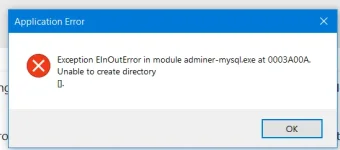
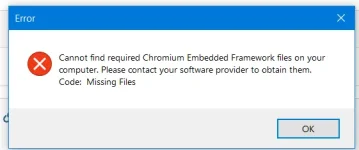
@gdgsupport Currently I am running Exeoutput 2025. When clicking on the "Place a copy of AdminNeo and run it" the following error always popup and application get closed.

Error : Cannot find the required Chromium Embedded Framework files on your computer. Please contact your software provider to obtain them. Code : Missing Files

Currently using Windows 10, Laravel Application. Already installed Additional AdminNeo Package for exeoutput 2025. Why this is occurring. Can anyone helps to resolve it.
Image attached below
 

Attachments
  • error.webp
    error.webp
    10.2 KB · Views: 0
  • error1.webp
    error1.webp
    9 KB · Views: 0
Last edited:
Solution
Copy the EXE file you generated to "YOUR PROJECT FOLDER\MySQL\Adminer\adminer-mysql.exe".
This is the path expected. Thus, the error "Warning: Cannot start the portable MySQL server. Try to restart the application or maybe the connection port is already taken" will disappear.
A side note "Place a copy of AdminNeo and run it" is still broken
Place a copy of the generated EXE file here too:
"C:\Program Files (x86)\GDG Software\ExeOutput for PHP 2025\MySQL\Adminer\adminer-mysql.exe"
That should fix this issue too.
AdminNeo requires the CEF (Chromium Embedded Framework) files to be installed. Normally, these files are installed automatically when you install ExeOutput for PHP, so they should already be present on your system. However, if the installation did not complete properly, that could explain your issue.

To do this, navigate to the Redist subfolder inside your ExeOutput for PHP installation directory. There you will find a file named exocefruntime2025-0.exe. Simply run this installer, and it will install the missing CEF components, which should resolve the issue.
 
@gdgsupport Thanks for your response. I ran the installer again as you suggested, but the same issue persists. I then completely uninstalled everything, re-downloaded ExeOutput, and performed a fresh installation. Unfortunately, the issue is still occurring. Previously I used version 2021 and it was working. This new version is causing all these issue. Please let me know how to resolve it
 
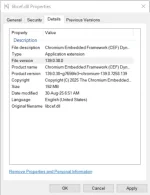
File Version : 139.0.38.0.
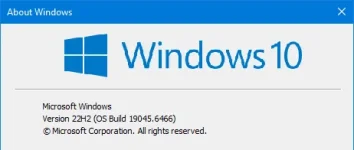
I am currently using Windows 10

Attaching images of both
 

Attachments

  • Screenshot 2025-12-23 155615.webp
    Screenshot 2025-12-23 155615.webp
    9.6 KB · Views: 0
  • Screenshot 2025-12-23 155502.webp
    Screenshot 2025-12-23 155502.webp
    18.2 KB · Views: 0
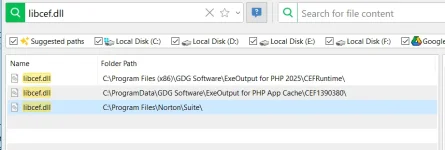
So there is another CEF version installed by another software on your computer that could probably interfere.
Can you try to search for all libcef.dll files on your computer? With a tool like UltraSearch Free?
 
I have verified my system and both Microsoft Visual C++ 2015–2022 Redistributables are installed:
  • x64 version 14.42.34433
  • x86 version 14.42.34433
These versions exceed the minimum requirement for CEF 139+. Please let me know if there is any other dependency or configuration we should check.
 

Attachments

  • send.webp
    send.webp
    27.7 KB · Views: 0
Try this: open the Adminneo EXOP project file in ExeOutput, select the older CEF version, and build it.
After that, place the generated EXE in your project’s MySQL subfolder.
 
I generated adminer-mysql.exe from the project present in the folder C:\Program Files (x86)\GDG Software\ExeOutput for PHP 2025\MySQL\Adminer using the Engine "Latest CEF (Chromium V139.0.38)" and placed the MySQL subfolder in project folder.

The Adminer is opening right now after showing an error "Warning: Cannot start the portable MySQL server. Try to restart the application or maybe the connection port is already taken"

The Adminer is opening when I close the above error and DB is accessible. I will verify if all the DB operations are working. A side note "Place a copy of AdminNeo and run it" is still broken
 
Copy the EXE file you generated to "YOUR PROJECT FOLDER\MySQL\Adminer\adminer-mysql.exe".
This is the path expected. Thus, the error "Warning: Cannot start the portable MySQL server. Try to restart the application or maybe the connection port is already taken" will disappear.
A side note "Place a copy of AdminNeo and run it" is still broken
Place a copy of the generated EXE file here too:
"C:\Program Files (x86)\GDG Software\ExeOutput for PHP 2025\MySQL\Adminer\adminer-mysql.exe"
That should fix this issue too.
 
Solution
Back
Top