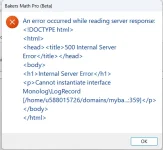
The error comes from the web server, before the request reaches the WooCommerce Integration Kit.
The HTML in your screenshot is not a reply from the kit. It is a "Checking your browser before accessing" page, a bot protection check that runs JavaScript in a web browser before letting the visitor in. Your application is not a browser and does not run JavaScript, so it receives this page instead of the kit's answer, and reports it as an unreadable server response.
The /hcdn-cgi/ address in that page points to Hostinger CDN. If your site is hosted there with the CDN enabled, this page is shown when one of these is active:
- "Under Attack" mode
- a high security level
- the automatic attack protection
To fix it:
- In hPanel, go to Websites > Dashboard > Performance > CDN > Manage > Security. Turn off "Under Attack" mode if it is on, and lower the security level (for instance to Medium), then try the activation again.
- If it still fails, ask Hostinger support to exclude the folder of the WooCommerce Integration Kit (the Base Activation URL set in your XLS Padlock project) from the browser check. Hostinger explains that such exceptions can only be added by their support. Give them the full URL, the time of a failed attempt and, if possible, the x-hcdn-request-id header of the blocked request.
- To confirm the cause, you can also disable the CDN for a few minutes, try the activation, then enable it again.
The exception should cover the whole kit folder, not only the activation page: deactivation (and online validation, if you enable it) are sent to the same server and would be blocked in the same way.