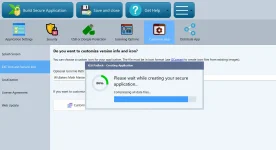
A build that sits at a fixed percentage (80% here) for tens of minutes almost always means something outside XLS Padlock is stalling that step, not XLS Padlock itself looping. The 80% region is where the compiled EXE is protected and, if you enabled it, code-signed, which is exactly where an antivirus or a signing timeout tends to freeze the process.
Please check these, in order:
Antivirus / security software. This is by far the most common cause. Real-time protection scans the large EXE while it is being written and protected, and can hold the file open indefinitely. Temporarily disable your antivirus (and Windows Defender real-time protection), or add exclusions for the XLS Padlock installation folder, your project's output folder, and XLSPadlockDesigner.exe, then build again.
Code signing. If you turned on "digitally sign the application", the build contacts a timestamp server at that stage. If that server is slow or unreachable, the step hangs. Temporarily switch signing off and build: if it now completes, the stall is the signing/timestamp step and we sort the certificate and timestamp settings next.
Output location and free space. Build to a normal local folder, not a network drive or a cloud-synced folder (OneDrive, Dropbox), and make sure the disk is not nearly full.
To narrow it down fast: does a brand-new, minimal test workbook build all the way to the end, or does it also stop at 80%? If the small one finishes, the issue is environment or project size on the real workbook; if even the small one stalls, it is almost certainly the antivirus or the signing step above.